Converting a Wireless Trackball to Wired
I recently got myself a left-handed trackball, the Elecom EX-G.
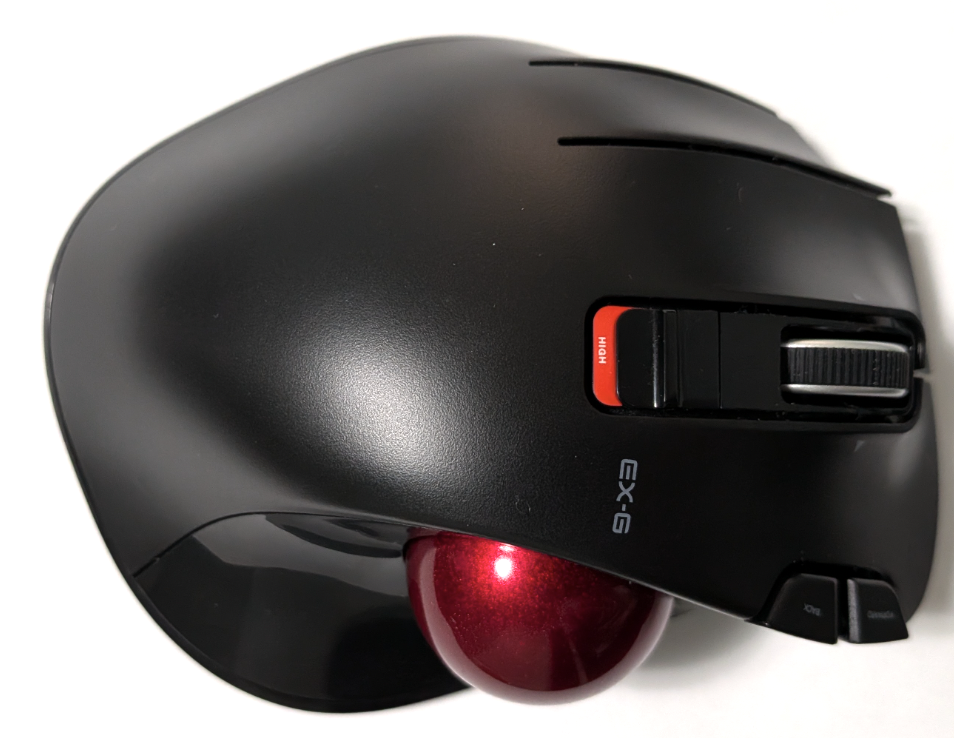
Getting the trackball was a bit of a whim. My mouse is getting a bit long in the tooth and I was curious what the experience is like to use a trackball. I’m fortunate to not currently suffer from RSI or other ailments that impede the use of a mouse.
I’m not left-handed, but a some years ago, when I was playing PC games a lot, I started developing a slight throb in my right wrist. I was concerned that it might be an early indicator of RSI so I chose to move over to a left-handed mouse. Since then I’ve been fairly comfortable with the left-handed mouse setup. I wanted the trackball to be left-handed. It appears that Elecom is the only one making a left-handed trackball.
Considerng that 90% of software bugs are written by right-handed people, I’m hoping my use of a left-handed input device puts me in the other 10% of bugs camp.
The EX-G worked great for about two weeks. I plugged the wireless receiver into my computer and it just worked. No software to install and no futzing with the OS mouse settings. It only took a week to start to feel comfortable using the trackball in day to day tasks.
Unfortunately, about two weeks in, it started to skip around and stutter. I noticed not only did the mouse cursor movement stutter, but the scroll wheel was also stuttering. To try and fix the issue I tried blowing out the optical sensor for the trackball. I also changed the battery and moved the wireless receiver dongle to other usb ports on my computer. My hunch is that it’s an issue with the wireless connectivity, but it could be something internal to the controller as well. I have a long standing anti-wireless stance due to historical issues like this, but being the only left-handed trackball that I found my choices were limited.
My plan was to return the EX-G and either go back to my left-handed mouse or try out a right-handed trackball. Then a thought occurred to me, with many of the do it yourself keyboards happening and since the EX-G is already shaped nicely for a left hand perhaps I could convert it to wired. Bouncing the idea of a couple of people it seemed like a reasonable thing to attempt.
The Hardware
I did a quick search for “micro controller to use for custom mouse”. One that came up a lot was the Atmega32U4. I ended up ordering a set of three Atmega32U4 development boards from Amazon.
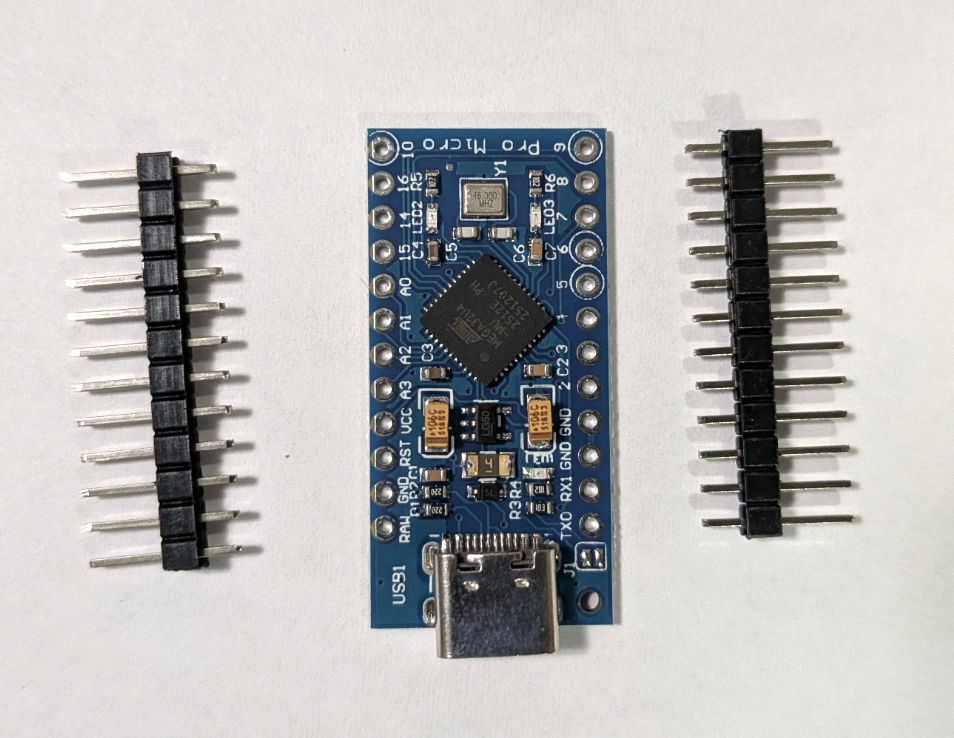
I have an older Arduino starter kit. I’m hoping the breadboard as well as other peripherals in the kit will allow me to develop the Atmega32U4 into a working mouse controller.
I have a soldering iron that will allow me solder one of the Atmega32U4 development boards to the supplied pin headers. This should make it easier to develop using the above mentioned bread board.
I can get access to a 3D printer. I’m thinking I may need to print something that will hold the final Atmega32U4 development board securely in the EX-G housing. I haven’t looked to see if someone already has a 3D model for housing the specific development boards. If not I will likely need to learn how to build up a model.
The Plan
The goal is to convert the EX-G into a wired trackball. The hope is that this will provide a stable and reliable trackball experience.
Requirements
The must have functionality:
- Trackball shall work at 1500 DPI. The 1500 DPI is the setting of the high option switch, which is is what I had been using previously. There is no need for the low/high switch itself to work.
- The three common mouse clicks shall work.
- primary (left-click)
- secondary (right-click)
- middle click
- The scroll wheel shall function as a normal mouse scroll wheel
- Trackball is powered via the usb
Stretch goals:
- Left and right scrolling via the scroll wheel
- Forward and back buttons
- On the fly adjustment of DPI. I think the low/high switch alone is too coarse. One idea is to have a 5 second period after the DPI switch is changed such that the forward and back button could bump the up or down by 100-200 DPI on each press.
I’m not too concerned about the click under the ring finger.
Proposed Steps
- Figure out how to develop on the Atmega32U4 development board.
- Get the board to up and running with the Arduino IDE or similar
- Get the board to respond to a simple switch input. This switch would not be from the EX-G at this time.
- Get the board to output mouse commands
- Figure out how to interpret the trackball sensor
- Disassemble the EX-G in a non destructive manner.
- Attempt to identify the sensor part and get its specification
- Failing a dedicated sensor specification reverse engineer the inputs and outputs of the sensor
- Figure out the scroll wheel sensor
- Re-use disassembled state from above step
- Attempt to identify the sensor part and get its specification
- Failing a dedicated sensor specification reverse engineer the inputs and outputs of the sensor
- Program the Atmega32U4 for the EX-G switches and sensors
- Initial pass will be connecting to the Atemga32U4 on the breadboard
- Get the Atmega32U4 to output the switches and sensors as the correct mouse events
- Placement of the Atmega32U4 development board in the EX-G body
- Determine where to place the Atmega32U4
- Likely print some kind of housing to support the Atmega32U4
- Consider how to anchor the printed housing. Can this be glued or epoxied? Does the housing need to be shaped to the EX-G body for a secure fit?
- Final assembly
I’m thinking before tearing into the EX-G, and perhaps destroying it, it’s best to focus on getting the Atmega32U4 working. Once conficdence has been built that I can develop for the Atmega32U4 and get it to behave like a mouse, then I can focus on the EX-G specifics. It may be that I should consider sooner in the teardown if the Atmega32U4 could fit in the EX-G body and how, but I’m pretty confident that’s low risk and something will work there.
I don’t have much low level electronics experience. I think the click buttons are likely simple buttons. The scroll wheel is likely a common hardware interface. The trackball sensor is the bigger unknown to me. I think the trackball sensor is just a mouse sensor pointing at the trackball instead of mat or desk, so is likely to be a fairly common hardware interface. Even then, it’s still the higher risk to me so should be looked at sooner in the development process.