Serial Peripheral Interface on PMW3320DB-TYDU
Reading through the data sheet for the PMW3320DB-TYDU sensor, the primary interface is SPI (Serial Peripheral Interface). I have no prior experience with this interface, or really most hardware communication interfaces. I needed to pause on actual code writing and hardware wiring to spend some time learning about SPI.
Serial Peripheral Interface
Doing some internet research it seems that SPI is a common protocol used in embedded systems for communicating between integrated circuits.
I’m going to cover the pieces that I’ve found important for how I plan to communicate with the PMW3320DB-TYDU sensor. There are a number of good references for deeper dives on SPI if one is inclined:
Three Wire SPI
I’m going to skip explaining four wire SPI and only focus on three wire, since that’s what the PMW3320DB-TYDU uses.
Three wire SPI uses three connections:
- CLK clock used for synchronizing data transmission
- DATA data input and output. This one has multiple names; SISO(slave in/slave out), MOMI(master out/master in). The PMW3320DB-TYDU data sheet uses SDIO. I’m going to keep it generic as DATA
- CS chip select
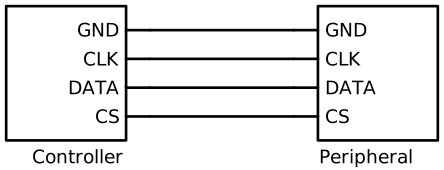
I added a
GNDin the above image. When talking about three wire, the ground is implied. I wanted to be explicit that the ground is needed for the other wires to function.
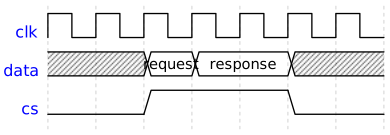
The controller is constantly sending a clock signal on the CLK wire. The
frequency of the signal is based on the hardware characteristics of the
controller and the peripheral.

The controller will initiate the communication to the peripheral. It does this
by first activating the CS line and then sending the request across the DATA
line. The controller will keep the CS line active for as long as necessary to
either; send more requests or receive responses.
The need for the CS line didn’t initially make sense to me. I couldn’t
understand why there was a need to “select a chip” when talking to the
peripheral. I thought it was some way to get the peripheral to do something
else.
The CS line is for when a controller needs to talk to multiple SPI
peripherals. In these instances the CLK and DATA lines are shared between
all peripherals. The controller then selects which peripheral that should be
listening to the message.
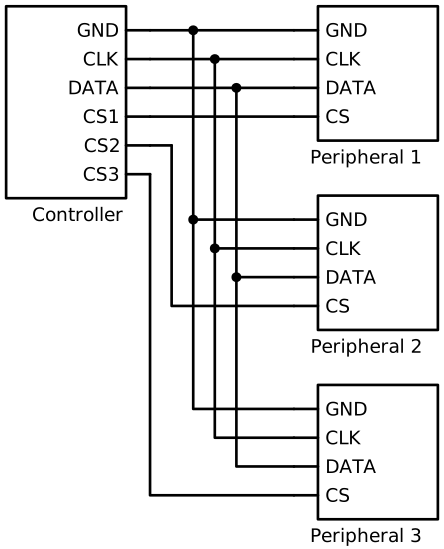
For the above diagram, if the controller wants to talk to Peripheral 2 it will
activate the chip select pin CS2. Then it will send the data on the common
DATA line. Only Peripheral 2 will read the data and potentially send back a
response, while CS2 is active. Peripheral 1 and Peripheral 3 will ignore the
communication since their CS pins were not set active.
Polarity and Phase
The way data is sent on the SPI DATA lines has two main settings. The polarity
and the phase.
CPOL
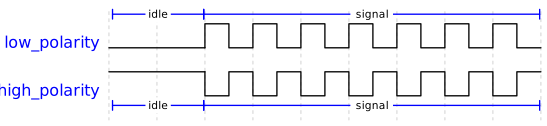
The polarity is often abbreviated as CPOL(Clock POLarity). The polarity specifies if digital low or digital high is the idle value. Idle refers to the default voltage level when the clock is not actively transitioning.
CPHA
The phase is often abbreviated as CPHA(Clock PHAse). The phase
determines when data bits are made available on the DATA line with respect to
the clock signal. There are two modes often called CPHA0 and CPHA1:
CPHA0: Bits are output when the clock transitions to its idle value. Bits are read when the clock transitions to active value.
CPHA1: Bits are output when the clock transitions to its active value. Bits are read when the clock transitions to idle value
For example if we had a configuration using a low polarity clock and CPHA0, the data transmission signal would look something like:
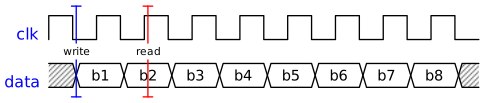
The writing of bit 1, b1 occurs when the clock signal drops low.
The reading of the value will occur when the clock signal rises high. This
provides half a clock cycle of tolerance for the data to be ready on the DATA
line.
SPI with PMW3320DB-TYDU
Looking at the
data sheet
for the PMW3320DB-TYDU there is only a mention of the maximum SPI frequency.
There are no details pertaining to the CPOL or CPHA. There isn’t even
information on what the bits sent and read on the SPI DATA line should look
like.
I did some digging to try and get more insight on interfacing with the PMW3320DB-TYDU. This digging came up short, but I was fortunate enough to come across data sheets for the ADNS-3050 and the ADNS-5050 sensors.
While these sensors aren’t technically from same manufacturer, I was able to find out that, PixArt (PMW3320DB-TYDU) and Avago (ADNS) entered into a license agreement back in 2006. The result being that Avago exited the manufacture of optical mouse sensors and PixArt began producing the Avago designs.
With the above licensing understanding and looking at the ADNS data sheets, it’s likely that the PMW3320DB-TYDU uses a high polarity clock with CPHA1.
From the ADNS-5050 data sheet:
The sensor outputs SDIO bits on falling edges of SCLK and samples SDIO bits on every rising edge of SCLK
The ADNS-5050 data sheet also contains information writing to the registers:
The first byte contains the address (seven bits) and has a “1” as its MSB to indicate data direction. The second byte contains the data.
as well as reading from the registers:
The first byte contains the address, is sent by the micro-controller over SDIO, and has a “0” as its MSB to indicate data direction. The second byte contains the data and is driven by the ADNS-5050 over SDIO.
ADNS Insights
The ADNS data sheets contained other information for interacting with the ADNS sensors.
There was an explanation of “Burst Mode”. It is initiated by reading from the
BURST_MOTION register. For the ADNS-5050 it only sends back 7 of the
registers. There was a note highly recommending the use of burst mode.
The DELTA_X and DELTA_Y registers store twos compliment 8 bit values. These
registers are cleared after being read.
In the ADNS-3050 data sheet it says:
For higher than 500 dpi setting, use 12-bit motion reporting to achieve maximum speed.
I wasn’t able to find the other 4 bits for motion in the ADNS-3050 data sheet,
but this likely explains the DELTA_XY register in the PMW3320DB-TYDU data
sheet.
DELTA_XY Upper 4 Bits for Delta X & Y Displacement
The ADNS-3050 data sheet explains motion polling and motion interrupt stating:
Motion polling is recommended to be used in the corded application like USB gaming mouse that requires fast motion response.
Next Steps
While the ADNS data sheets provide more insights into how to communicate with the PMW3320DB-TYDU via SPI. There are still some missing details about the register settings. With my new found understanding of SPI, I was thinking that I could reassemble the EX-G trackball enough for it to function and program the Atmega to spy on the SPI communication for the factory EX-G.
Then I started thinking, “isn’t this what a logic analyzer does?”. It’s too bad I don’t have a logic analyzer.
Then later in the day I realized, I have both an Atmega development board as well as an Arduino UNO, I bet someone has already made a logic board sketch that will work on one or the other of these boards.
While I could try to figure out the registers by setting values and seeing what happens, I think I’ll be better off snooping on the EX-G SPI as it:
- powers on
- reads track ball movements
- switches between 750DPI and 1500DPI modes
- switches between low power and high speed modes
So the next steps will be to configure my Arduino UNO as a logic analyzer and see if I can capture the SPI communications to gain a better understanding of interfacing with the PMW3320DB-TYDU.