Using Internal Pull-up Resistor of the Atmega
The Atemaga32U4 provides internal pull-up resistors.
After learning that I will need pull-up resistors in the previous post, I decided to keep the wiring simple by leverage the internal ones.
The wiring from the previous post needs to be altered so that the button press
will set the input pin LOW.
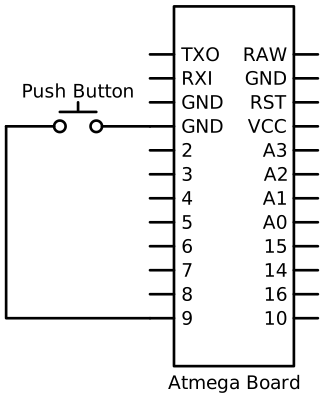
The physical setup on the bread board would look similar to the following
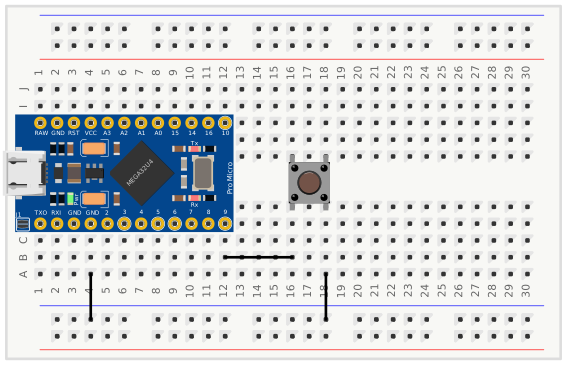
The code will need to be modified in two ways:
- to look for
LOWinstead ofHIGH - Use
INPUT_PULLUPinstead ofINPUT. As the name implies theINPUT_PULLUPwill use the internal pull-up resistor.
#include <Mouse.h>

int clicked = false;
int mouseClickButton = 9;
void setup() {
  pinMode(mouseClickButton, INPUT_PULLUP);
  Mouse.begin();
}

void loop() {
  bool low = digitalRead(mouseClickButton) == LOW;
  if (low && !clicked)
  {
    clicked = true;
    Mouse.press();
  }
  else if (!low && clicked)
  {
    clicked = false;
    Mouse.release();
  }
}
Building the breadboard and uploading this code worked for me on the first go. I
wanted to verify the internal pull-up was working. in order to do this I
reverted the INPUT_PULLUP back to INPUT. When using INPUT I noticed a
couple of behaviors. Pushing and immediately releasing the button and while
moving my mouse would result in a mouse selection that would continue for a
second or two after the button was released. Implying that it was taking a bit
for the input to come back to HIGH. The other thing I noticed is that if I
moved the mouse cursor somewhere in a text buffer and waited a few seconds I
would get a stray click from the Atmega. Using INPUT_PULLUP I did not see any
of those behaviors. I’m taking the lack of these behaviors as evidence that the
INPUT_PULLUP is working as expected.
Debounce
I noticed, sometimes when I pressed the button in my text buffer, it would
select an entire word. This behavior happened with the use of INPUT_PULLUP and
seems to indicate a double click occurring. Fortunately when I mentioned this
project to a colleague, they preemptively gave a tip to learn about “debounce”.
The Arduino IDE provides a built in example for
button debounce.
This example is a good when the loop() is used for other things besides the
button press. When the loop is only used for the button press a delay can be
added to the end of the loop for the same results. Since I only want to see if I
can solve the multiple presses I’m going to add a delay to the end of the loop.
The code updated to have a 10ms delay
#include <Mouse.h>

int clicked = false;
int mouseClickButton = 9;
void setup() {
  pinMode(mouseClickButton, INPUT_PULLUP);
  Mouse.begin();
}

void loop() {
  bool low = digitalRead(mouseClickButton) == LOW;
  if (low && !clicked)
  {
    clicked = true;
    Mouse.press();
  }
  else if (!low && clicked)
  {
    clicked = false;
    Mouse.release();
  }
  delay(10);
}
After adding the delay and reprogramming the Atmega board the double click events from a single press are now gone. The delay is only 10ms versus the 50ms in the debounce example, because I noticed that the Arduino IDE example for a button mouse only uses a 10ms delay at the end of its loop.
A delay in the loop is not an ideal long term solution. It prevents the Atmega from processing other events that may occur during that delay time. The delay time would need to be large enough to accommodate the worst bouncing input. For example if there is an input that needs 500ms or half a second to settle that would be very noticeable to a user wanting to do mouse clicks, especially double clicks. The logic from the debounce example should be tailored per input and let the loop continue to process other events. I ran across an interesting post where the author creates a common class to be able to use per input, https://www.e-tinkers.com/2021/05/the-simplest-button-debounce-solution/.