EX-G Scroll Wheel Part 2
In the previous post Seeed Studio XIAO ESP32S3 Trackball Motion, I showed the code that’s coming together from all my previous learnings on this journey to convert an EX-G trackball wired. I had implemented up the motion sensor portion of the trackball. Now I want to focus on the scroll wheel.
From Getting the EX-G Scroll Wheel Working on Atmega32U4, I had determined that the scroll wheel was a rotary encoder. It has three wires; one black and two white. I had used the black wire as a common ground and used the two white wires as the rotary encoder signal wires.
Rotary Encoder Library
The previous rotary encoder investigation utilized code from https://arduinogetstarted.com/tutorials/arduino-rotary-encoder. I could take this and modify it for my needs, but there are a number of libraries out there that encapsulate rotary encoder logic to provide simpler interfaces.
One requirement that I had was for the library to be available from the Arduino Library Manager. Using a library from the library manager allows me to leverage a sketch project file to specify the library and version. This prevents the need to maintain instructions to manually install the library or some kind of higher level build file to do it.
Doing a search for rotary encoders on the Arduino libraries website shows a number of libraries. One piqued my interest, ESP32Encoder. This library was specifically written for the ESP32 hardware. It leverages a pulse counter built into the hardware.
The library supports full quadrature and half quadrature encoders. In the initial foray into rotary encoders, I hadn’t explored these terms or their differences.
Which Quadrature?
Rotary encoders have two signal lines. As the rotary encoder is turned, the signal lines cycle through the following four states:
- (0, 0)
- (0, 1)
- (1, 1)
- (1, 0)
Notice how the (1, 1) state is in the middle and not the end.
Below is an example signal diagram of what would be output if one turned a rotary encoder at a constant speed.
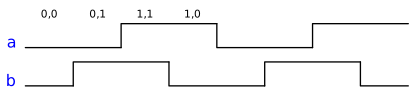
A full quadrature encoder will count every one of the states. This means if the
rotary encoder steps through (0, 0) -> (0, 1) -> (1, 1) -> (1, 0)
-> (0, 0), a full quadrature encoder will count 4 steps.
A half quadrature encoder will count once for every step from (0, 0) ->
(1, 1). If a rotary encoder steps through (0, 0) -> (0, 1) ->
(1, 1) -> (1, 0) -> (0, 0), a half quadrature encoder will say that 2
steps happened.
I didn’t know whether the physical scroll wheel from the EX-G was a full quadrature or a half quadrature. To figure this out I decided to code up a sketch that would print the signal values anytime a value changed.
int lastD0 = LOW;
int lastD1 = LOW;
void setup() {
  pinMode(D0, INPUT_PULLUP);
  pinMode(D1, INPUT_PULLUP);
  Serial.begin(115200);

}

void loop() {
  int d0 = digitalRead(D0);
  int d1 = digitalRead(D1);
  bool changed = false;
  if (d0 != lastD0){
    lastD0 = d0;
    changed = true;
  }
  if (d1 != lastD1){
    lastD1 = d1;
    changed = true;
  }
  if (changed) {
    Serial.print("(0x");
    Serial.print(d0, HEX);
    Serial.print(", 0x");
    Serial.print(d1, HEX);
    Serial.println(")");
  }
}
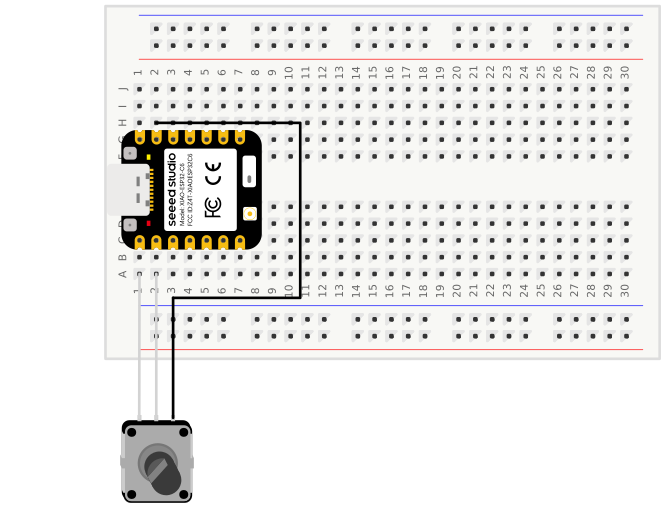
I was able to compile and upload this sketch. I connected the ESP32S3 GND
to the black wire of the scroll wheel, and the two white wires to D0 and D1
of the ESP32S3 board.
Running this sketch and monitoring the serial output of the ESP32S3 provided results similar to:
(0x0, 0x1)
(0x1, 0x1)
(0x0, 0x1)
(0x1, 0x1)
(0x0, 0x1)
(0x1, 0x1)
(0x0, 0x1)
(0x0, 0x0)
(0x0, 0x1)
(0x1, 0x1)
(0x0, 0x1)
(0x0, 0x0)
Every time the scroll wheel went into a mechanical detent the last line printed
was either (0x0, 0x0) or (0x1, 0x1). This gave the conclusion that the
scroll wheel was a half quadrature rotary encoder.
ScrollWheel.hpp
With the quadrature resolution determined, there’s enough information to make an
attempt at writing up the scroll wheel code. I followed a similar model as in
Seeed Studio XIAO ESP32S3 Trackball Motion.
ScrollWheel is a class that has an instance of an ESP32Encoder. The
constructor of the class takes in the pins that will be used on the ESP32S3 for
the scroll wheel inputs. The constructor passes the pins to its ESP32Encoder
instance and initializes the ESP32Encoder.
The class provides a delta() function which can be polled for how much scroll
wheel movement has occurred since the last time it was called. This function
returns a
std::optional
containing
std::nullopt or
the amount scrolled.
#ifndef SCROLL_WHEEL_HPP
#define SCROLL_WHEEL_HPP
#include <Arduino.h>
#include <ESP32Encoder.h>
#include <optional>

class ScrollWheel {
public:
  /**
   * @brief Construct a ScrollWheel that uses 2 signal pins
   *
   * Sets the 2 signal pins as inputs with pull-up resistors
   *
   * @param a The first signal pin of the scroll wheel
   * @param b The second signal pin of the scroll wheel
   */
  ScrollWheel(uint8_t a, uint8_t b) : _encoder() {
    ESP32Encoder::useInternalWeakPullResistors = puType::up;
    _encoder.attachHalfQuad((int)a, (int)b);
  }

  ScrollWheel(const ScrollWheel &) = delete;
  ScrollWheel &operator=(const ScrollWheel &) = delete;

  /**
   * @brief Get the scroll delta since the last read.
   *
   * Returns the accumulated encoder count and resets it to zero.
   *
   * @return The scroll delta, or std::nullopt if no movement occurred.
   */
  std::optional<int8_t> delta() {
    _encoder.pauseCount();
    auto count = _encoder.getCount();
    if (count != 0) {
      _encoder.clearCount();
      _encoder.resumeCount();
      return (int8_t)count;
    }
    _encoder.resumeCount();
    return std::nullopt;
  }

private:
  ESP32Encoder _encoder;
};

#endif // SCROLL_WHEEL_HPP
Since the code was fairly small, I ended up implementing it all in the header.
The count value from the ESP32Encoder is a 16 bit value. The delta()
function returns an int8_t, since Mouse.move() takes an int8_t for
scrolling. In order to ensure the value doesn’t overflow, the code clears the
count anytime it reads a value. There is a possibility, if delta() isn’t
polled often enough, that the count could exceed an int8_t. I think it’s
unlikely to happen under normal usage. If the count does exceed an int8_t the
result is likely no scroll or less scroll for one period.
Connecting this code to the ex-g.ino sketch, that was written in the previous
post, is a fairly small change and similar to adding the MotionSensor logic.
Include the header file. Use a std::optional for holding the ScrollWheel
instance that is initialized to nullopt. Use emplace() to create the
ScrollWheel instance in the setup() function.
The loop() requires the most change. Since Mouse.move() is used for both the
x, y movement value as well as the scroll value, the logic needed to be
expanded to take into account scroll or motion.
void loop() {
  auto motion = sensor->motion();
  auto scroll = scrollWheel->delta();
  if (motion || scroll) {
    auto m = motion.value_or(Motion{0, 0});
    Mouse.move(m.delta_x, m.delta_y, scroll.value_or(0));
  }
}
Full ex-g.ino code
#include "MotionSensor.hpp"
#include "ScrollWheel.hpp"
#include <USB.h>
#include <USBHIDMouse.h>
#include <optional>

USBHIDMouse Mouse;
std::optional<MotionSensor> sensor;
std::optional<ScrollWheel> scrollWheel;
/**
 * @brief Called once at program startup to perform initialization.
 *
 * Place any hardware or application initialization code here; this function
 * is invoked once before the main execution loop begins.
 */
void setup() {
  Mouse.begin();
  USB.begin();
  // D8, D9, D10 are SPI pins
  sensor.emplace(D7, 1500);
  scrollWheel.emplace(D0, D1);
}

/**
 * @brief Executes repeatedly after setup to perform the sketch's main logic.
 *
 * This function is invoked in a continuous loop by the Arduino runtime; place
 * recurring or periodic code here. Currently the implementation is empty.
 */
void loop() {
  auto motion = sensor->motion();
  auto scroll = scrollWheel->delta();
  if (motion || scroll) {
    auto m = motion.value_or(Motion{0, 0});
    Mouse.move(m.delta_x, m.delta_y, scroll.value_or(0));
  }
}
Testing Out The Code
I compiled and uploaded the sketch. Unplugged the ESP32S3 and plugged it back in. Then I attempted to scroll. It scrolled down as expected. Scrolling up was jittery and often bounced up and down, while more or less staying in the same place.
In order to debug, I needed another way to look at the outputs coming from the
scroll wheel. I modified the sketch file to use Serial.print() instead of
Mouse.move() and monitored the serial output.
Modified sketch file
#include "MotionSensor.hpp"
#include "ScrollWheel.hpp"
#include <optional>

std::optional<MotionSensor> sensor;
std::optional<ScrollWheel> scrollWheel;
void setup() {
  Serial.begin(115200);
  // D8, D9, D10 are SPI pins
  sensor.emplace(D7, 1500);
  scrollWheel.emplace(D0, D1);

}

void loop() {
  auto motion = sensor->motion();
  auto scroll = scrollWheel->delta();
  if (motion || scroll) {
    auto m = motion.value_or(Motion{0, 0});
    Serial.print("scroll: ");
    Serial.print(scroll.value_or(0));
    Serial.print(", x: ");
    Serial.print(m.delta_x);
    Serial.print(", y: ");
    Serial.println(m.delta_y);
  }
}
With the above code running on the ESP32S3, scrolling down printed out a series
of -1.
scroll: -1, x: 0, y: 0
scroll: -1, x: 0, y: 0
scroll: -1, x: 0, y: 0
scroll: -1, x: 0, y: 0
scroll: -1, x: 0, y: 0
Scrolling up was another story:
scroll: 1, x: 0, y: 0
scroll: -1, x: 0, y: 0
scroll: 1, x: 0, y: 0
scroll: -1, x: 0, y: 0
scroll: 1, x: 0, y: 0
It printed out alternating values.
The first thing I did was try and look for any obvious mistakes I might have made in my code. Like usual, my code was flawless (sarcasm). Nothing stood out as obviously wrong in the code.
Doing some internet searches I ran across a few mentions of “experiment with
using full versus half quadrature library settings”. Moving over to the full
quadrature implementation only required changing one line in the ScrollWheel
constructor.
    //_encoder.attachHalfQuad((int)a, (int)b);
    _encoder.attachFullQuad((int)a, (int)b);
Using the full quadrature implementation, the serial output was more consistent.
One direction printed a series of -1 for the scroll value, the other direction
printed a series of 1. However when I scrolled slowly, from physical
detent to physical detent, at times there wouldn’t be a new line output on the
serial terminal. At other times, two lines would be printed out. I tried
swapping the two signal lines between D0 and D1 on the ESP32S3, but got
similar results.
Lacking ideas on what could be causing the intermittent missed events and double
events, I decided to bring back the actual Mouse.move() logic with the full
quadrature interface. Uploading that to the ESP32S3 allowed the scroll wheel to
scroll up and down on pages more or less alright. When moving the scroll wheel
slowly it could be noticed that the page might not scroll between detents, or
that it would jump more than it should.
Eventually I decided to plug the scroll wheel back into the original EX-G hardware and see how it behaved. Without fail, it would perform one scroll between each detent in either direction.
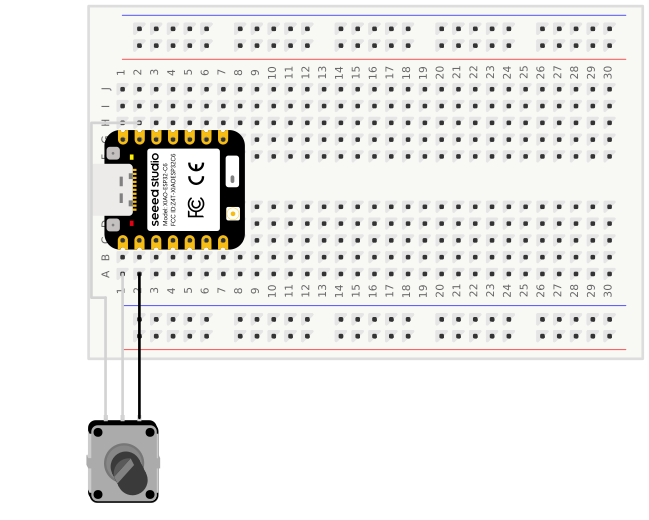
At this point I had been debugging and trying things for a couple of hours. Feeling a bit frustrated, I decided to call it a day and tackle the problem again the next day. While putting things away I looked at the EX-G circuit board and a light bulb went off. I never actually checked which wire of the scroll wheel was ground. I assumed (make an “ass” of “u” and “me”) that the black wire would be ground and the two whites would be the signal lines. Doing continuity checks on the scroll wheel connector of the circuit board revealed that the white wire on the outside was actually ground. This left the middle white and black wires to be the signal lines. I still finished cleaning up for the day.
The next day, I rewired the scroll wheel based on my new-found insight
In order to better understand the output, I first went back to the serial print
version. The serial terminal was consistently printing two lines per detent. -1
for one direction and 1 for the other.
scroll: -1, x: 0, y: 0
scroll: -1, x: 0, y: 0
I reverted the ScrollWheel constructor back to the half quadrature interface.
This resulted in one line printed per detent. Going back to Mouse.move()
resulted in consistent scrolling in both directions!
In hindsight, looking at the output when I was trying to determine if the scroll
wheel was full or half quadrature, it stands out that the value of (0x1, 0x0)
was never output. This is because with one of the signal wires used as ground
the resulting signal was:
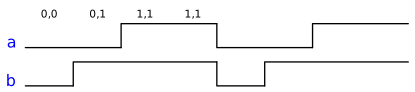
The logic would only print if it saw a change in one of the signals. This is why
one never sees two lines of (0x1, 0x1). I’m guessing the pulse counter on the
ESP32S3 that the ESP32Encoder library used, expected a correctly functioning
signal so when it went from (0x1, 0x1) directly to (0x0, 0x0) it threw it
off and resulted in skipping some transitions.