Second Attempt to Control the PMW3320DB-TYDU with SPI
Now that I’ve got the 3 wire SPI working correctly, it’s time to revisit communicating with the PMW3320DB-TYDU sensor.
I’m going to use a slightly modified version of the code I used in my first attempt. I now know that the esp32c6 doesn’t support working as USB mouse so I will just print the mouse movement values. I also moved the interaction with the PMW3320DB-TYDU sensor to a dedicated function.
Code for talking to PMW3320DB-TYDU
#include <SPI.h>

const int tWakeup = 55;
// This time was re-used from capture taken for OEM EX-G initializing
// PMW3320DB-TYDU
const int tPowerUpCs = 2;

// Time between commands, in µs
//
// Based on https://www.espruino.com/datasheets/ADNS5050.pdf
// worst case is tsww at 30 µs, which is time from last bit of first byte to
// last bit of second byte. At max speed of, 1,000,000 Hz 8 bits would take 8 µs
// leaving a pause of 22 µs.
//
// The data sheet also mentions
//
//    SCLK to NCS Inactive, tSCLK-NCS, 20 µs from last SCLK rising edge to NCS
//    (for write operation) rising edge, for valid SDIO data transfer.
//
// This seems to imply that we need 20 μs before moving chip select back high,
// so we'll cheat and re-use this value of 22 (for now?)
const int tWµs = 22;

const int IDLE_READ = 0x00;

const int PROD_ID = 0x00;
const int POWER_UP_RESET = 0x3A;
const int PERFORMANCE = 0x22;
const int RESOLUTION = 0x0D;
const int AXIS_CONTROL = 0x1A;
const int BURST_READ_FIRST = 0x42;
const int MOTION = 0x02;
const int DELTA_X = 0x03;
const int DELTA_Y = 0x04;

typedef struct {
  bool moved;
  int x;
  int y;
} Movement;

SPISettings settings;

void setup() {
  Serial.begin(115200);
  SPI.begin();
  settings = SPISettings(1000000, SPI_MSBFIRST, SPI_MODE3);
  pinMode(SS, OUTPUT);
  initPmw();
}

void loop() {
  checkMouseMovement();
}

void checkMouseMovement() {
  Movement movement = readMovement();
  if (movement.moved) {
    Serial.print("Delta x: ");
    Serial.println(movement.x);
    Serial.print("Delta y: ");
    Serial.println(movement.y);
  }
}

void initPmw() {
  // Drive High and then low from https://media.digikey.com/pdf/data%20sheets/avago%20pdfs/adns-3050.pdf
  digitalWrite(SS, LOW);
  digitalWrite(SS, HIGH);
  delay(tPowerUpCs);
  digitalWrite(SS, LOW);
  delay(tPowerUpCs);

  delay(tWakeup);

  write(POWER_UP_RESET, 0x5A);
  read(PROD_ID);
  write(PERFORMANCE,0x80);
  write(0x1D,	0x0A);
  write(0x14,	0x40);
  write(0x18,	0x40);
  write(0x34,	0x28);
  write(0x64,	0x32);
  write(0x65,	0x32);
  write(0x66,	0x26);
  write(0x67,	0x26);
  write(0x21,	0x04);
  write(PERFORMANCE, 0x00);
  write(RESOLUTION,	0x86);
  read(AXIS_CONTROL);
  write(AXIS_CONTROL,	0xA0);
  write(BURST_READ_FIRST,	0x03);
  read(MOTION);
  read(DELTA_X);
  read(DELTA_Y);
}

Movement readMovement() {
  uint8_t motion = read(MOTION);
  Movement movement = {};
  if (motion) {
    movement.moved = true;
    movement.x = (int8_t)read(DELTA_X);
    movement.y = (int8_t)read(DELTA_Y);
  }
  return movement;
}

void write(uint8_t reg, uint8_t value) {
  digitalWrite(SS, LOW);
  SPI.beginTransaction(settings);
  SPI.transfer((uint8_t)(0x80 | reg));
  delayMicroseconds(tWµs);
  SPI.transfer(value);
  delayMicroseconds(tWµs);
  SPI.endTransaction();
  digitalWrite(SS, HIGH);
}

uint8_t read(uint8_t reg) {
  digitalWrite(SS, LOW);
  SPI.beginTransaction(settings);
  SPI.transfer(reg);
  delayMicroseconds(tWµs);
  uint8_t ret_value = SPI.transfer(IDLE_READ);
  delayMicroseconds(tWµs);
  SPI.endTransaction();
  digitalWrite(SS, HIGH);
  return ret_value;
}
The code compiles and uploads to the esp32c6.
Connecting to the PMW3320DB-TYDU
I need to wire the esp32c6 to the PMW3320DB-TYDU. The wiring will be based on Navigating the PMW3320DB-TYDU Data Sheet and Failing to Control the PMW3320DB-TYDU with SPI
The raw circuit diagram is:
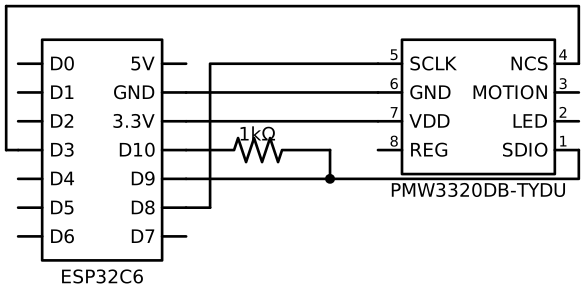
Notice the 1 kΩ used between D10 and D9. This resistor value is from
Debugging 3-Wire SPI Controller.
The broadboard wiring is similar to the following:
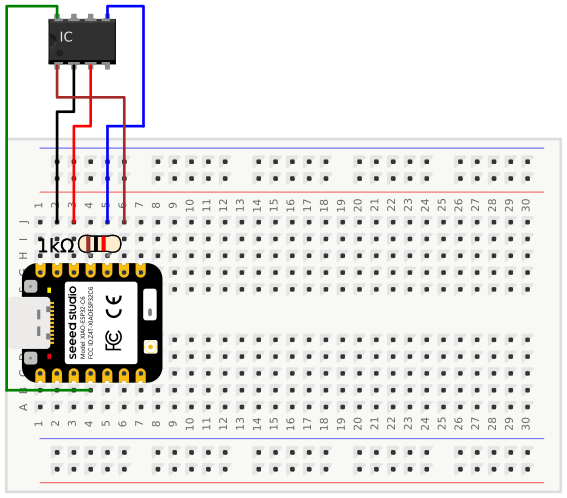
I used a generic 8 pin IC pictorial from the Fritzing App for the PMW3320DB-TYDU.
Running with the devil PMW3320DB-TYDU
I don’t actually know how to read the serial output via the command line. Doing
a quick internet search shows the monitor subcommand to the arduino-cli tool
can do this.
arduino-cli monitor -p /dev/cu.usbmodem1301 --fqbn esp32:esp32:XIAO_ESP32C6 --config 115200
I’m not sure the fbqn is necessary, but the port and the config for baud rate
are. The baud rate should match the one used in Serial.begin(). Many examples
online show 9600. I chose 115200 because it’s faster, more speed! Having a
faster rate probably doesn’t matter for this use case.
The serial connection is made, the terminal is blank. It’s time to move the trackball and see what happens.
The serial connection prints a series of:
Delta x: 0
Delta y: -2
Delta x: 0
Delta y: -2
Delta x: 0
Delta y: -2
Delta x: 0
Delta y: -2
Delta x: 0
Delta y: -2
Delta x: 0
Delta y: -2
Delta x: 0
Delta y: -2
These values seem kind of low, and almost too consistent. Trying to move the
trackball faster results in similar values. I wonder if I messed up the casting
from uint8_t to int8_t. Since I’m not using the Mouse library yet, I don’t
really care about the sign of the value. I can update the Movement struct to
use uint8_t for the delta values:
typedef struct {
  bool moved;
  uint8_t x;
  uint8_t y;
} Movement;
Then remove the int8_t casting:
    movement.x = read(DELTA_X);
    movement.y = read(DELTA_Y);
Compile and re-run.
Delta y: 0
Delta x: 0
Delta y: 252
Delta x: 252
Delta y: 0
Delta x: 252
Delta y: 0
Delta x: 0
Delta y: 252
Delta x: 252
Delta y: 0
Delta x: 252
Delta y: 0
Delta x: 0
Delta y: 0
Delta x: 0
Those 252 values are equivalent to -3 in
twos compliment. That’s pretty
close to the same thing. It seems odd these values always remain so small.
One thing I’ve experienced in the past is error propagation. Where continually adding values to a result ends up with a smaller value than expected.
For example: we have 20 measurements of 1.25. Ideally these would sum to 25. However if the mechanism we use to sum them uses an integer as an accumulator we may only get 20. The first value is added to the accumulator. It has to get converted to an integer so ends up being 1. The next value get’s added and it also gets truncated down to combine with accumulator resulting in a total of 2. Even though we’ve added 2.5 total into the accumulator, being an integer it can only represent it as 2.
The ADNS-3050
data sheet mentions that reading the DELTA_X register will clear it. Same
for the DELTA_Y. The code implementation tries to read the values as fast as
the loop() will run. Could it be that the register stores a lower precision
than the actual sensor, and the aggressive reading is causing such low values?
Recall from Serial Peripheral Interface on PMW3320DB-TYDU, the PMW3320DB-TYDU data sheet lacks sufficient details, so I’ve been leaning on the ADNS-3050 data sheet.
An easy thing to try, is add a delay in the loop(). I’m going to choose 20 ms
because it’s a nice number. I’m also going to revert the Movement back to
using int.
void loop() {
  checkMouseMovement();
  delay(20);
}
Let’s compile and run this:
Delta x: 15
Delta y: 13
Delta x: 23
Delta y: 13
Delta x: 24
Delta y: 5
Delta x: 25
Delta y: 0
Delta x: 32
Delta y: 1
Delta x: 29
Delta y: -9
Something about these values gives me more confidence that it’s working.
Double Checking int8_t casting
Looking again at the ADNS-3050 data sheet I notice the MOTION_ST register says
only bit 7 of the register is an indicator of motion. Bits 0-6 are reserved. My
logic is keying off any bit in the MOTION_ST register being set. Maybe
without the delay, I’m reading from the DELTA_X and DELTA_Y registers when
they’re not really ready.
Time to go back to the uint8_t Motion struct, remove the delay, and also
convert the moved field to uint8_t. I’ll store the moved as read from the
PMW3320DB-TYDU, instead of setting the struct field to true.
I’ll also get a bit fancier on the printing:
void checkMouseMovement() {
  Movement movement = readMovement();
  if (movement.moved) {
    Serial.print("moved: ");
    Serial.println(movement.moved);
    Serial.print("moved (hex): 0x");
    Serial.println(movement.moved, HEX);
    Serial.print("Delta x (uint8_t): ");
    Serial.println(movement.x);
    Serial.print("Delta x (int8_t): ");
    Serial.println((int8_t)movement.x);
    Serial.print("Delta x (hex): 0x");
    Serial.println(movement.x, HEX);
    Serial.print("Delta y (uint8_t): ");
    Serial.println(movement.y);
    Serial.print("Delta y (int8_t): ");
    Serial.println((int8_t)movement.y);
    Serial.print("Delta y (hex): 0x");
    Serial.println(movement.y, HEX);
  }
}
Compile and run this one.
moved: 128
moved (hex): 0x80
Delta x (uint8_t): 255
Delta x (int8_t): -1
Delta x (hex): 0xFF
Delta y (uint8_t): 0
Delta y (int8_t): 0
Delta y (hex): 0x0
moved: 128
moved (hex): 0x80
Delta x (uint8_t): 255
Delta x (int8_t): -1
Delta x (hex): 0xFF
Delta y (uint8_t): 0
Delta y (int8_t): 0
Delta y (hex): 0x0
moved: 128
moved (hex): 0x80
Delta x (uint8_t): 255
Delta x (int8_t): -1
Delta x (hex): 0xFF
Delta y (uint8_t): 0
Delta y (int8_t): 0
Delta y (hex): 0x0
moved: 128
moved (hex): 0x80
Delta x (uint8_t): 255
Delta x (int8_t): -1
Delta x (hex): 0xFF
Delta y (uint8_t): 0
Delta y (int8_t): 0
Delta y (hex): 0x0
It seems like the conversion is working correctly. There is 255 as -1, and 128 as 0x80.
The runs have been showing different values. The first run I was getting -2. The second run I was getting 252, or -3. Now in this run I’m getting -1. I think I’ll chalk up the differences due to variations in the timing of the polling loop and when I moved the trackball for the sensor to capture the values.
Using Interrupt
The ADNS-3050 data sheet has a section titled “Motion Polling” and another called “MOTION Interrupt”. Reading through the motion polling section, I’m not seeing anything that suggests a delay between polls. The numbers I got from having the delay seemed more reasonable.
I know the EX-G uses motion interrupt for determining when to read the sensor. I think using the interrupt might give me better results.
I haven’t done an interrupt before, so will need to look up how to do it.
Doing an internet search leads pretty quickly to the
attachInterrupt()
function. In the setup() function you need to choose a pin and set it as an
input, likely with an internal pull up resistor, see
Using Internal Pull-up Resistor of the Atmega.
Then that same pin should be used in attachInterrupt(). The docs specifically
mention that the pin number shouldn’t be used directly. Instead wrap the pin
number in
digitalPinToInterrupt().
The ISR, or interrupt service routine, takes a function with no arguments and
with no returns. Fortunately the checkMouseMovement() function I created will
fit the bill nicely.
Wiring Updates
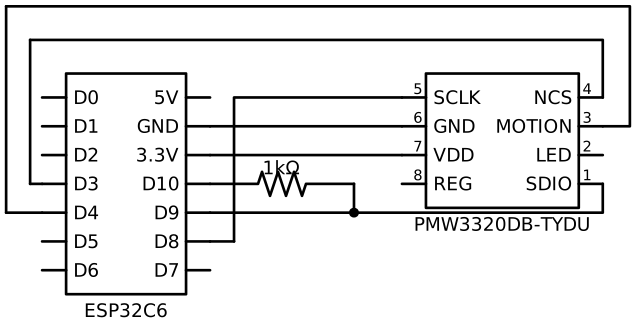
To get the interrupt to work I need to connect the MOTION pin of the
PMW3320DB-TYDU to a pin on the esp32c6. The pin needs to be a pin that can
handle an interrupt. For the esp32c6 it seems that all of the GPIO pins can work
as interrupts. I arbitrarily chose the pin next to the chip select pin.
Updated wiring diagram, notice the new line on the top of the image:
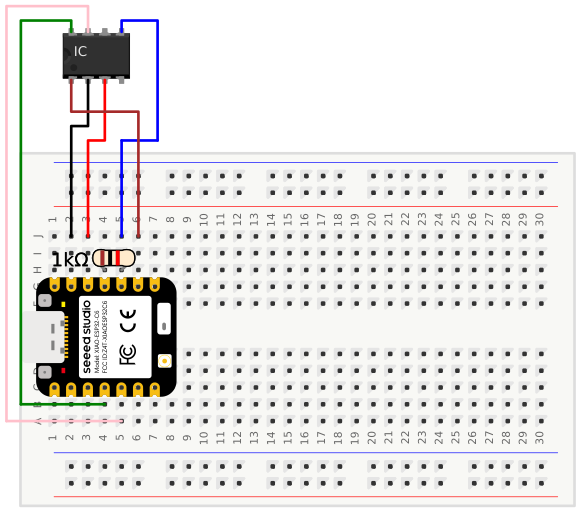
Below is an example of the updated broad board wiring. Notice the addition of the pink wire on the left.
Code updates
I’m going to revert the code to what I had initially and then make modifications
to support an interrupt. The code update to use the interrupt is fairly small,
due to the way the code was broken up. I need to remove the
checkMouseMovement() call from the loop(). Then I need to add a pin as an
interrupt in setup() and use checkMouseMovement() as the interrupt function.
I’m using FALLING as the trigger since the PMW3320DB-TYDU uses low as active
signals, and I want to know when the MOTION signal goes from high to low.
void setup() {
  Serial.begin(115200);
  SPI.begin();
  settings = SPISettings(1000000, SPI_MSBFIRST, SPI_MODE3);
  pinMode(SS, OUTPUT);
  initPmw();
  pinMode(22, INPUT_PULLUP);
  attachInterrupt(digitalPinToInterrupt(22), checkMouseMovement, FALLING);
}

void loop() {
}
Compile and upload the changes, cross fingers.
Moving the trackball I get:
Delta x: -1
Delta y: 0
Delta x: -1
Delta y: 0
Delta x: 0
Delta y: 1
Delta x: 0
Delta y: -1
Those are small values, like when I was polling aggressively. They also don’t seem to increase in magnitude much if I move the trackball faster. Apparently my thought that the values were too low was incorrect.
There is a problem I notice when using the interrupt version. At times I stop getting output from the serial port. Re-uploading the sketch or restarting the esp32c6 will get it working again.
Back to the ADNS-3050 data sheet. Rereading the section on motion interrupt
The MOTION signal is active low level-triggered output. The MOTION pin level will be driven low as long the MOTION_ST bit in register 0x02 is set and motion data in DELTA_X and DELTA_Y registers ready to be read out by the micro-controller
I’m using FALLING in the interrupt setup. This means when the MOTION signal
initially goes from high to low it will trigger the interrupt. If the interrupt
reads the data out and there hasn’t been any motion by the time it’s done the
signal goes back high. The next time there’s movement the MOTION signal will go
low triggering the interrupt. However, if any movement occurs while still in the
interrupt the MOTION will stay low. This means it won’t go high and the
FALLING trigger won’t happen to fire the interrupt.
As the Arduino docs say there is a LOW option to attachInterrupt(). I’ll
change to that and see what happens.
Nothing!
Nothing happens when the trackball is moved and the LOW option is used? I’ll
move it back to FALLING and re-upload incase it failed to compile and upload
before. Going back to FALLING outputs movements again. Going back to LOW
still gives nothing.
Jumping to the definition of
FALLING.
In the header file there is a nice little section titled “Interrupt Modes”.
//Interrupt Modes
#define DISABLED  0x00
#define RISING    0x01
#define FALLING   0x02
#define CHANGE    0x03
#define ONLOW     0x04
#define ONHIGH    0x05
#define ONLOW_WE  0x0C
#define ONHIGH_WE 0x0D
There is no LOW in that list. Time to double check the Arduino docs for
interrupts:
- mode: defines when the interrupt should be triggered. Four constants are predefined as valid values:
- LOW to trigger the interrupt whenever the pin is low,
- CHANGE to trigger the interrupt whenever the pin changes value
- RISING to trigger when the pin goes from low to high,
- FALLING for when the pin goes from high to low.
The docs clearly say LOW? Time to look at the definition of
LOW.
#define LOW  0x0
#define HIGH 0x1
It looks like LOW maps to DISABLED for the interrupt mode. This likely
explains why nothing was happening, it was disabled.
There is an ONLOW value. That seems like a good option to test out.
Update the code to ONLOW, compile and upload…
It works!
It continues to print the motion values and doesn’t seem to get stuck.
My takeaway. When I don’t fully read the docs, I incorrectly use a falling interrupt when it should have been a low interrupt. When I do read the docs and use the value specified, it doesn’t work. Either way I fail.
I’m a bit curious what the ONLOW_WE value is about. An
internet search
quickly reveals that the WE part stands for “wake up enable”. When these
interrupts trigger, they can wake up the esp32c6 if it was put into a low
power mode.